Using the first and the last version of Torvalds’s Git
Intro
Perhaps one of the most well-known stories of the Open Source world is the birth of Git: Linus Torvalds needed a version control system for the kernel Linux and gave us Git. While he is still the maintainer of the kernel, he was the maintainer of Git during only three months, from April to July of 2005. Since then, Git has been maintained by Junio Hamano.
Even if 20 years has passed since the leadership change, Git is still remembered as the second masterpiece of Linus Torvalds. Personally, I think that what makes Git great is its elegant core, which exists since its first version and that it is the main gift that Linus really gave us.
However, how usable was Git when Torvalds was the maintainer? Let’s found out this here, looking at two versions of Git:
- The first commit
- The last release by Torvalds
So check out what happened in this moment of Git history (pun intended).
Setup
Let’s go back in time. My time machine is Ubuntu 7.10 Gutsy Gibbon, released in 2007. It is old enough to have packages in the versions needed by the early Git, and fortunately, I could find a Docker image for that. I really wanted to use it in my modern Linux, but sadly it wasn’t easy to compile due to those library incompatibilities.
It’s really easy to obtain the source code of those old Git versions. It is, of course, versioned with Git and its first versions will be recorded forever in its history:
git clone git@github.com:git/git.git
cd git

# Listing the commits from oldest to newest. We want the first
git log --reverse

# Listing the versions prior to 1.0. We want the last released by Torvalds
git tag --list 'v0.*'
We’ll try to use the old Git for versionioning a simple fizzbuzz in C:
- First commit: a simple C code with only
#include <stdio.h>and main function - Second commit: add the printing loop
- Third and fourth commit: parallel commits, one adding fizz and other buzz
- Fifth commit: merge fizz and buzz
This is the commit graph that we want:
*   merge
|\
| * buzz
* | fizz
|/
* for
* initial
This is fizzbuzz code, written in a style that avoids merge conflicts:
#include <stdio.h>

void print(int i) {
    int fizzbuzz = 0;

    // fizz numbers

    if (i % 3 == 0) {
        printf("fizz");
        fizzbuzz = 1;
    }

    // buzz numbers

    if (i % 5 == 0) {
        printf("buzz");
        fizzbuzz = 1;
    }

    // other numbers

    if (!fizzbuzz)
        printf("%d", i);

    putchar('\n');
}

int main() {
    int i;

    for (i = 0; i < 100; i++)
        print(i);

    return 0;
}
First version: “The information manager from hell”
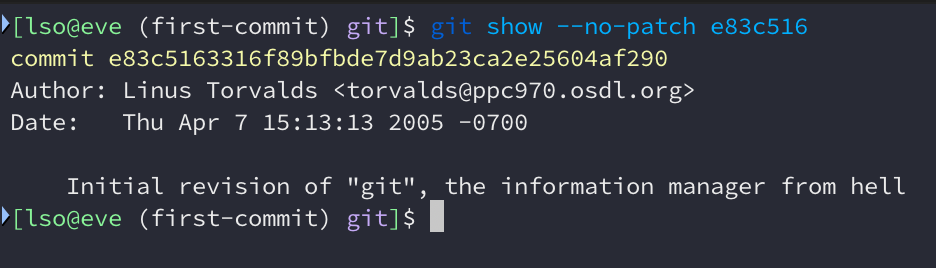
Let’s go back to Git’s first commit, e83c5163. Only 9 source files, a Makefile
and a README. Only 1036 lines of C code. There were some small problems in the
code and I couldn’t compile it by only running make. Luckly, they were easy to
fix (here’s the fixed code).
First weird thing that I noticed is that it didn’t create a git
executable. Instead, we have 7 executables:
init-db: equivalent togit initupdate-cache: equivalent togit update-indexorgit-addshow-diff: somehow equivalent togit diffon workdircat-file: equivalent togit cat-file -t+git cat-file -predirecting the output to a temp filecommit-tree: nowgit commit-treeread-tree: nowgit read-treewrite-tree: nowgit write-tree
The first one doesn’t exist anymore, at least with its original name. The last 4 still exist, but they are low-level plumbing commands.
Ok, so let’s play with them.
Initializing
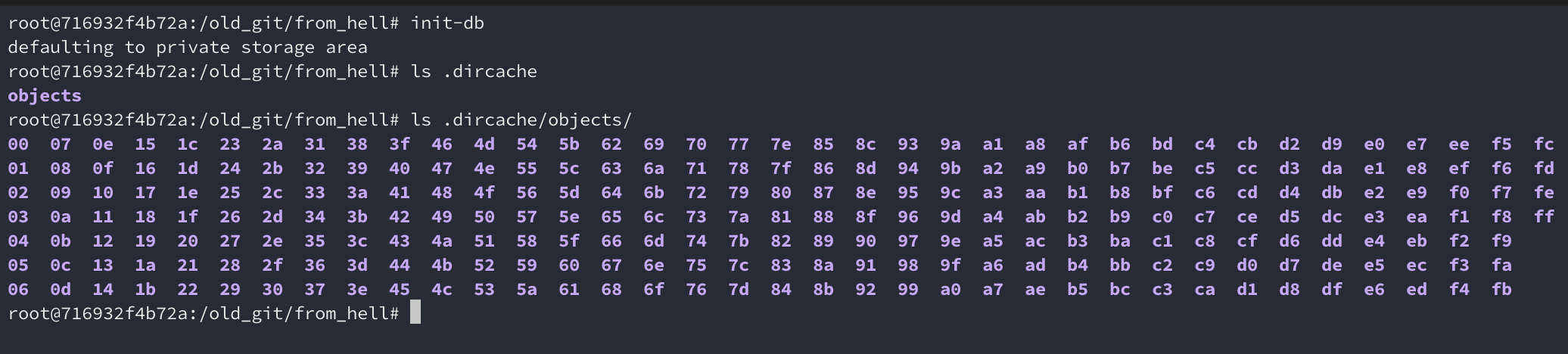
Firstly, I initialized a repository with init-db. It showed a mysterious
message “defaulting to private storage area”. Instead of creating .git, it
creates a .dircache directory containing only the objects directory, which
looks very familiar to .git/objects but containing all the 00~ff directories
by default:
Adding a simple C code to the index
Before we commit, wen eed to add our files to the staging area (the index). We
use update-cache to do that, just like we would do with git add:
update-cache fizzbuzz.c
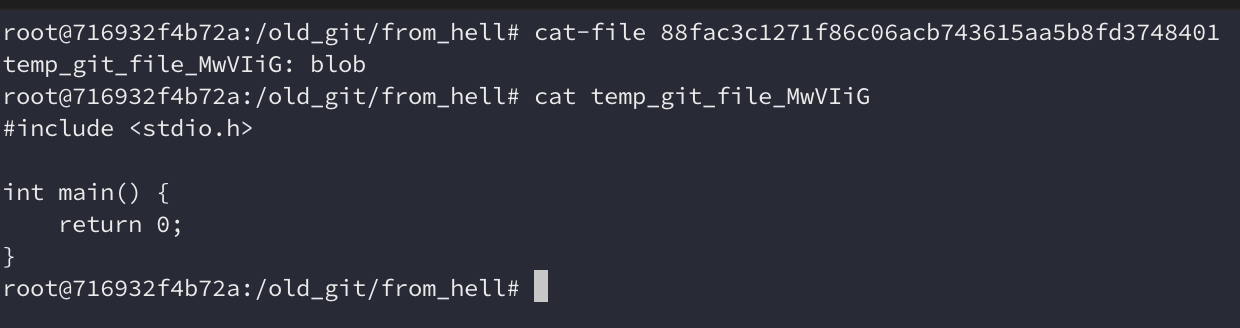
We can see that we now have a file name fac3c1271f86c06acb743615aa5b8fd3748401
inside .dircache/objects/88, which means that a new object
88fac3c1271f86c06acb743615aa5b8fd3748401 was created. In modern Git we could
inspect that using git cat-file -p and see the contents of that object. In
this first version we need to use cat-file and it shows that the object is
a blob (i.e. contains the content of a file) and creates a temporary file with
its contents:
A new file index was created inside .dircache, just like what we have in
modern Git. We don’t have a command for inspecting it (like git status or
git ls-files). We can use hexdump here, showing that it is
mapping that fizzbuzz.c to that blob. So it seems to be working.
Commiting
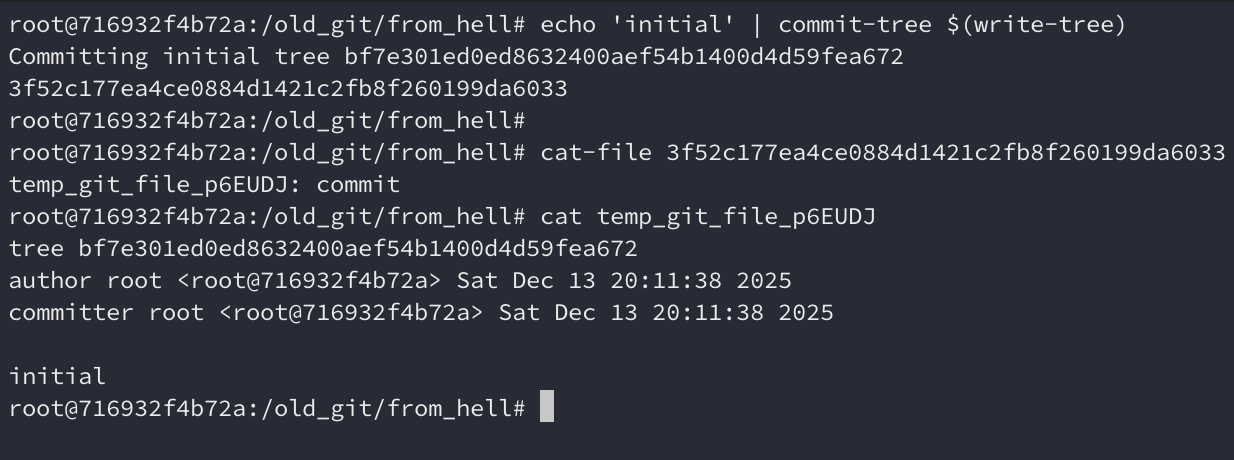
Now we want to commit. We don’t have git commit here, but we try to do it
manually like in modern Git we would through git write-tree +
git commit-tree (more info here).
This version already has primitive versions of those two commands, so let’s use
them.
We can see through cat-file that the commit was successfully created. It is
very similar to modern commits, however, we can see that it stores the
datetimes as plaintext instead of a timestamp with timezone.
The git add + git commit sequence would be:
# git add fizzbuzz.c
update-cache fizzbuzz.c

# git commit -m "my commit"
echo "my commit" | commit-tree $(write-tree) -p <parent commit>
Restoring the content
We don’t have git restore, git reset or git checkout here, so if we want
to retrieve an old version of a file we need to do that through cat-file.
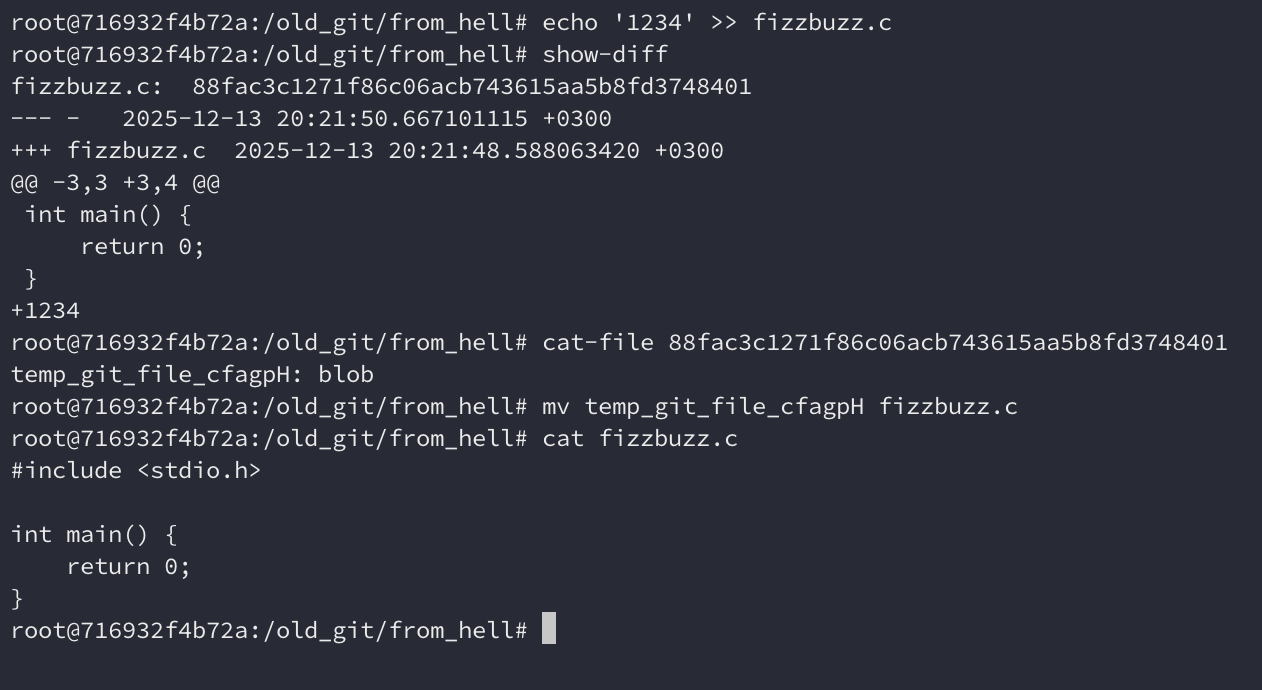
Let’s change fizzbuzz.c and try to restore it. show-diff show us the diff
compared to the index, so we can see the differences. Then, it’s possible
restore it using cat-file, but it requires the hash of the blob.
But what if we want to restore the content from another commit, like we usally
do withgit checkout? We’ll need to get the commit, then get its tree, and then
check the tree contents with hexdump, like this:
commit_content=$(cat-file <commit> | cut -d ':' -f 1)
tree_hash=$(cat $commit_content | head -n 1 | cut -d ' ' -f 2)
hexdump -C $(cat-file $tree_hash | cut -d ':' -f 1)
In our setup we only have one file, so the tree contains only one entry. This
way, the last 20 bytes is the hash of the blob that we want. If we use
cat-file to get that blob, we can rename the file to fizzbuzz.c.
blob_hash=$(tail -c 20 < $(cat-file $tree_hash | cut -d ':' -f 1) | xxd -p)
mv $(cat-file $blob_hash | cut -d ':' -f 1) fizzbuzz.c
Creating the other commits
The only difference in the next commits before merge is that they need to
reference their parent. We use the same sequence of update-cache, write-tree
and commit-tree, but using -p <parent> in commit-tree, like we would do
using the modern git commit-tree.
Our commit history now looks like this:
* buzz
| * fizz
|/
* for
* initial
Merge
There’s no merging algorithm yet, we have to merge the files manually and
create the merge commit. The merge commit is a commit with two parents, so we
can use the same sequence, but providing two -p <parent> to commit-tree.
Compatibility
Now it’s time to see if this repository is compatible with a new Git version
(I’m using 2.50.1). We can copy the index file and the objects
directory from .dircache to a new .git directory. Let’s what happens.
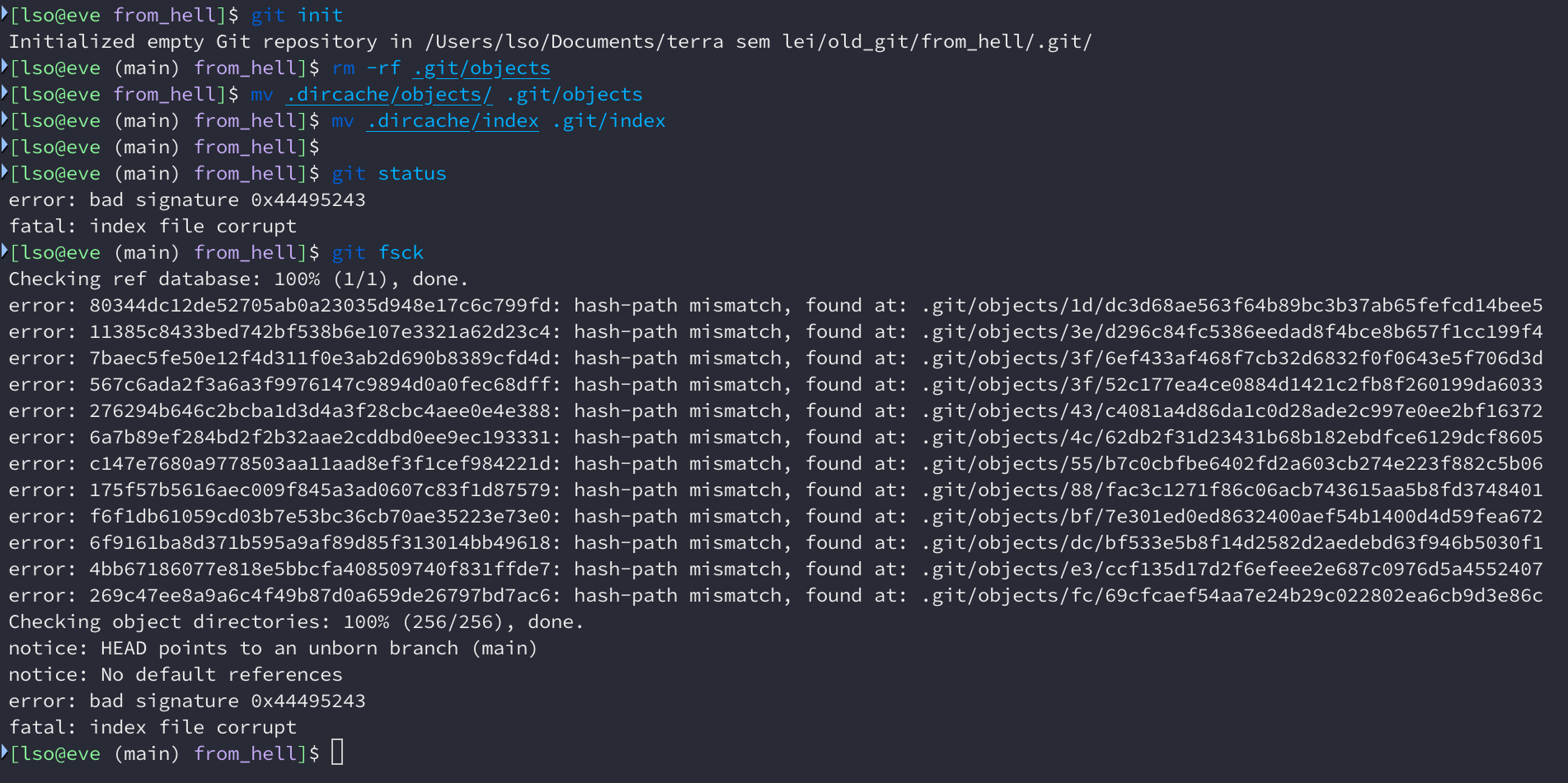
Oh no, all the copied files are considered broken by the new Git. git log
works, but git checkout doesn’t.
HEAD and branches
Perhaps you noticed that I didn’t mentioned anything about branches or the
current commit (HEAD). And that’s because these concepts didn’t exist at this
point. We only operate at the object and index level. You need to remember the
hash of each commit
Is it usable?
Not at all. Even if you know well how to manipulate Git objects, you’ll need to copy the hashes all the time. It’s hard to see what’s happening with those primitive commands and the lack of references makes things really hard. To make it a little more usable you’ll need to write a set of scripts to manipulate those objects.
The last version from Git’s father
The first commit is easy to find, but what about the last version by Linus Torvalds? We need to dive a little more in Git’s history and Git’s Git history to try to find where that happened.
Our first clue is the “Meet the new maintainer” message from Linus to the Git mailing list. It was sent in July 15, 2005, only after three months of the first commit. We can check the release tags around that date and see who generated them:
v0.99points to a commit by Junio, but still Signed-off-by Linus. This tag doesn’t have author info because it wasn’t implemented yet, it would take some days until we have the tagger information introduced here!v0.99.1is authored by Linus, and it’s the last version before the “Meet the new maintainer” e-mailv0.99.2is authored and Signed-off-by Junio
This way, Linus only released two versions of Git: v0.99 (in July 10) and
v0.99.1 (in July 15, only 5 days after). The first version (v0.99.1) by Junio
was release only two weeks later. It is worth noting that v0.99.1 is the last
version with Linus as the maintainer, but not the last version with him
involved. Actually, you can see by running git log --author='Linus Torvalds'
that he sent several patches since then.
v0.99.1 already has the git executable, but it is only a script for calling
other commands. You’ll see that this version is much more familiar. It has grown
in size, now it has 20292 lines of C code, 1092 lines of Perl code and 8673
lines of shellscripts (including tests).
Just like the first commit, it didn’t compile at first. I needed to remove
git-http-push from Makefile. I won’t use it and it was breaking the build.
Initializing
Now all the Git commands are under the git command, just like modern Git
(although we can still call them directly). Now git init-db generates a .git
directory containing HEAD and refs (where branches and tags live). In this
version, HEAD is a symlink to the branch that it points to, unlike newer Git
versions where it is a plaintext file.
Adding and commiting
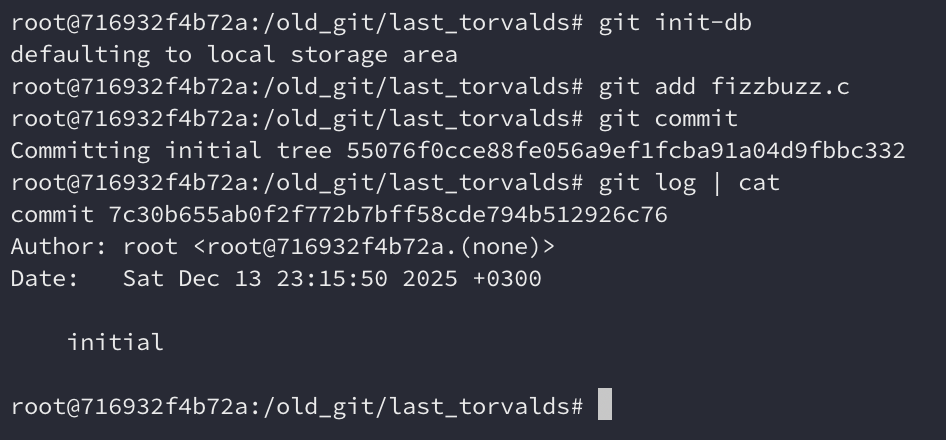
In this version, Git already has git add and git commit. git status
exists, but it doesn’t work if we don’t have at least one commit in our history.
We also have git log, but it doesn’t show the branch name.
Restoring the contents of a file
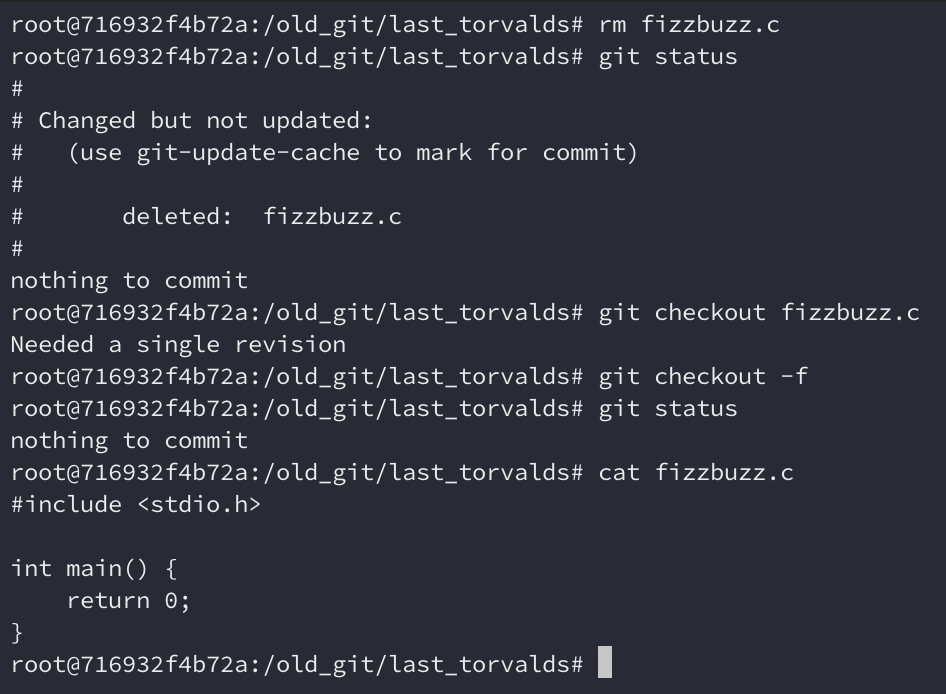
git status works if we already have a commit. It tell us that fizzbuzz.c was
deleted, and we can restore it using git checkout -f. Nice.
Creating other commits and branches
Since we have git add and git commit, we don’t need to play with the
plumbing commands to create new commits. We can also create new branches with
git checkout -b or git branch, and navigate between them using
git checkout, so this step is really like using a modern
Git. git checkout, however, can’t detach HEAD yet.
However, git rev-parse, git log and git branch doesn’t show the
current branch and git-symbolic-ref also doesn’t exist yet. The only way I
could find it was checking the symlink .git/HEAD.
Merge
git merge doesn’t exist yet, but the README says how to perform a manual merge
through git read-tree. We also have a script that Linus wrote for making it
easier, called git resolve. Internally, it depends on the merge command from
GNU RCS, so we need to have it installed.
It could merge both branchs correctly.

Compatibility
Everything seems to be working fine when opening this Git repository with Git 2.50. But this was only a simple repository with a single file, I don’t what happens with more complex repositories.
Is it usable?
If you know what’re you doing, this is usable. But you really need to know what you’re doing, the error messages doesn’t help too much. Several important Git features wasn’t implemented yet, so, even if this is familiar, you’ll need to understand the Git internals to use it.
Conclusion
It’s always nice to see the birth of something great. The first version of Git was a really simple set of utilities for manipulating some files, but it delivered the core that makes Git excellent. The last Torvalds’ Git is much more mature, and even though it feels a little fragile, it seems to be usable enough to be used by someone who really knows how to use it. Linus certainly did and used it for versioning Linux.
Even though Linus Torvalds is still remembered as the father of Git, the last version under his maintainership wasn’t exactly the Git that we know today. But, of course, it was an amazing kickoff and it’s impressive what he and the community built in those first three months.